Iris: the tool that connects the sky with the earth
    What is itHow it worksWhat is it for?Who is it for

    Iris: the tool that connects the sky with the earth

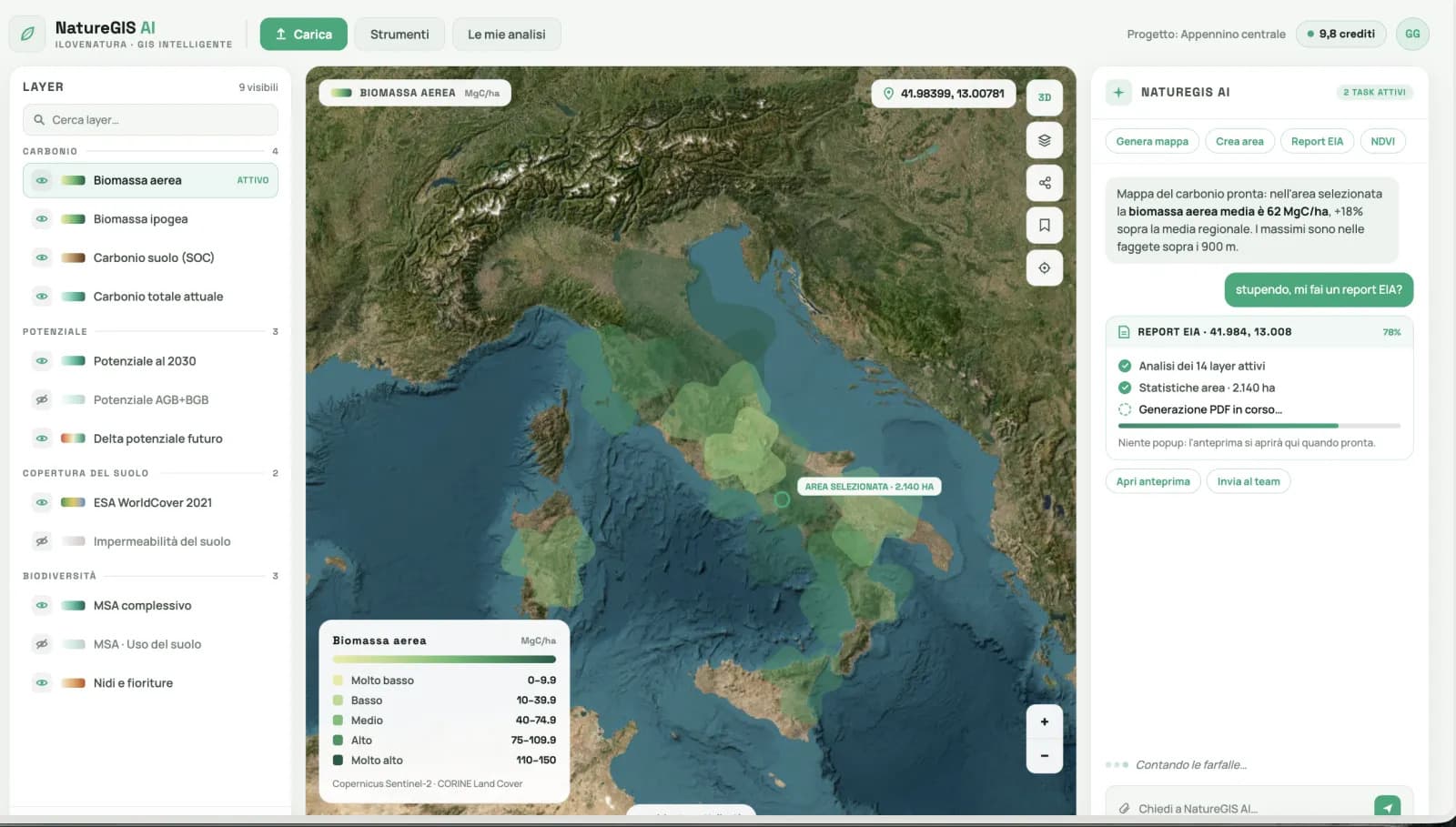
    Iris connects the sky to the earth: describe an area and a question, and the assistant generates environmental maps from satellite data, analyses them with real numbers, and delivers a ready-to-use report, all in the browser. It is iLoveNatura's conversational GIS, for reading the land without technical software.

    Read the article
    16/07/2026Of 3Bee, 3Bee, 3Bee
    80 Views
    16/07/2026Of 3Bee, 3Bee, 3Bee
    80 Views

    What is Iris

    Iris is the conversational GIS of 3Bee's iLoveNatura platform: the tool that connects the sky to the earth, transforming satellite imagery into concrete answers on the ground.

    Until yesterday, obtaining an environmental map required specialised software, technical expertise and days of processing. With Iris, you simply describe the area you are interested in and the question you have in mind in words: artificial intelligence does the rest, delivering maps, figures and a ready-to-use report.

    Everything takes place in the browser, with no installation required, and is available in five languages. In practice, it is like having an environmental analyst by your side to ask for what you need, with answers in minutes instead of weeks.

    What is Iris

    How it works, in three steps

    Iris works in three simple steps.

    1. Describe the area and what you need. You can enter an address, use your location, draw the area on the map or upload a KML/GeoJSON file. Then type your question in natural language.
    2. The AI generates the satellite maps. High-resolution environmental layers from Copernicus, Sentinel-2, Landsat and ESA WorldCover, cropped to your area and also available as a time series, month by month or year by year.
    3. Receive figures, proposals and reports. Statistics within the area and context, critical zones, trends over time and a formal report in PDF or Word, generated by the Report Builder.
    How it works, in three steps
    XNatura

    What it is used for: use cases

    The same questions you would ask a GIS analyst, with answers that are defensible even during assessments. A few concrete examples:

    • Environmental studies and EIA: screening and impact assessments with diagnostic maps and reports ready for the authorisation process.
    • Renewable energy: suitability and impact of photovoltaic and wind installations, land use and site-specific natural hazards.
    • Urban regeneration: identify heat islands and quantify the benefits of green roofs, depaving and new planting.
    • Agriculture and vineyards: vegetative vigour and water stress plot by plot, using the NDVI index.
    • Forestry and fire prevention: wildfire risk and vegetation status to establish intervention priorities.
    • ESG and BREEAM: measurable environmental evidence for audits, ratings and certifications.
    What it is used for: use cases

    Who it is for and how to get started

    Iris is designed for anyone who needs to understand or report on the state of an area: environmental professionals and consultancies, renewable energy developers, local authorities and town planners, agricultural businesses, bodies managing forests and parks, and companies committed to sustainability and certification.

    The best part is that you don't need to be a GIS expert: if you can ask a question, you can use Iris. The catalogue provides over 200 environmental layers, including maps, indicators and risks, each of which can also be viewed over time.

    You can try it for free in demo mode, without installing anything, directly from your browser. Iris is included in 3Bee's iLoveNatura · xNatura platform.
    XNatura
    16/07/2026Of 3Bee, 3Bee, 3Bee
    80 Views
    Newsletter
    newsletter
    Subscribe to the Blog about bees and biodiversity